
The Indian Railway has launched (13.08.2025) the E-pass module of the Human Resource Management System (HRMS) developed by CRIS for online pass generation and ticket booking by railway employees, Railway has announced it online via Press release. The E-Pass module has been developed by CRIS under the HRMS project and will be rolled out over Indian Railways in a phased manner from time to time.
HRMS Mobile App allows employees to view their historical data since the date of joining the railways, including details related to his increments, promotions, awards, transfers, postings, leave, training, composition of family as per records, and nominations for retirement benefits. This information is not readily available to employees at present, and brings transparency to administration. This application will be a single-window communication system between railway employees and the administration, the Ministry informed.
HRMS Railway Portal Overview
HRMS Railway portal helps the Railway employees to apply for leave applications, transfer, promotions, and awards, nominations for retirement benefits, and many more services.
| Portal Name | HRMS Railway |
| State | all-state of India |
| Services | Pay Slip Download, Apply for leave, etc. |
| Authority by | Government of India |
| Department | Railway Department, Government of India |
| Service for | Government Employees of Railway India |
| Help Desk No. | 8882704979, 9990844679, 7786940452 |
| Catagory | Govt. Portal |
| Official Site URL | hrms.indianrail.gov.in/HRMS |
With this facility, Railway employee is neither supposed to come to the office for applying for Pass nor has to wait for the pass being issued. The employee will be able to apply for a pass online from anywhere and get the E-Pass generated online. The complete process of application and generation of Pass is mobile friendly. Ticket booking on pass may also be done online on the IRCTC site apart from the earlier facility of counter booking from the PRS/UTS counter.
This facility will help Railway employees in using their pass hassle-free and simultaneously make the working of all officials involved in the issuance of Pass smooth.
| About HRMS Modules and Tutorials | Visit Website |
|
List of Dealing Clerks assigned for Data Entry in Employee Master Data and e-SR on HRMS Portal |
Visit Website |
HUMAN RESOURCE MANAGEMENT SYSTEM (HRMS)- USER GUIDELINES FOR RAILWAY EMPLOYEES
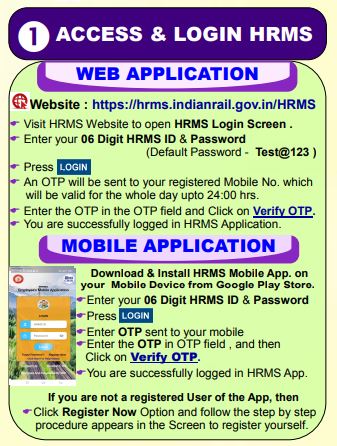
Step 1 – Access and Login HRMS
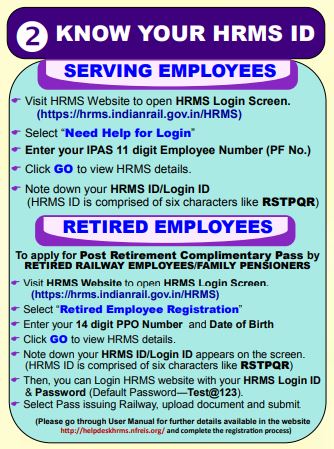
Step 2 – Know Your HRMS ID
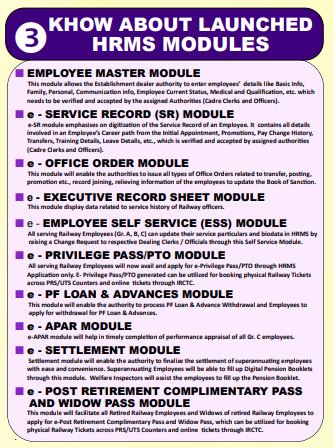
Step 3- Know About Launched HRMS Modules
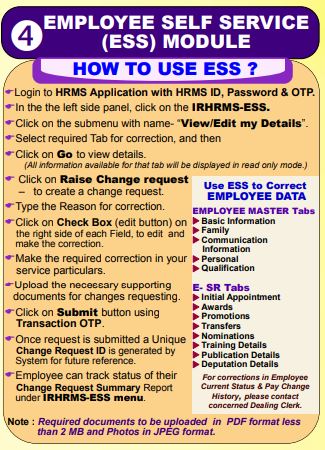
Step 4 – Employee Self Service ESS Module
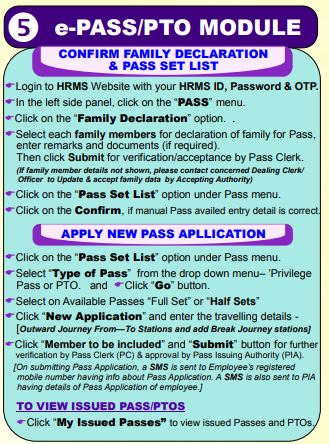
Step 5 – E Pass PTO Module
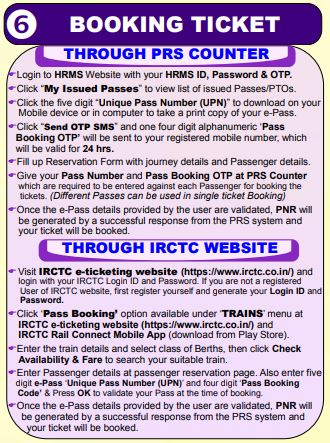
Step 6 – Booking Ticket
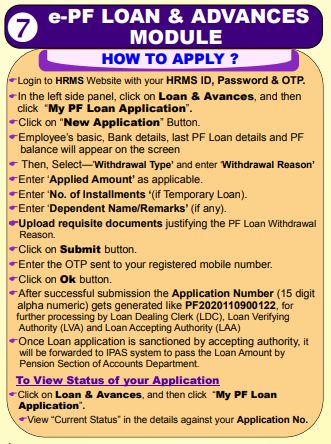
Step 7 – E PF Loan and Advances Module
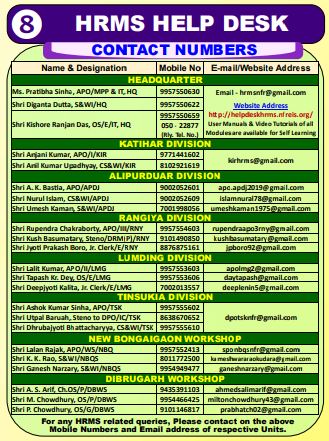
Step 8 – HRMS Help Desk
Salient Features of E-Privilege Pass/PTO Module
The salient features of E-Privilege Pass/PTO module are as under :-
- E- Privilege Pass/PTO module shall be available initially to all serving employees of Indian Railways w.e.f. 24.08.2025 and privilege pass/PTO generated through digital mode can be utilised for booking physical tickets across PRS/UTS counters and online tickets through IRCTC.
- No convenience fee shall be levied by IRCTC in case of online booking of tickets using E-Privilege Pass/PTO.
- The provision of physical passes shall also be there up to 31.10.2025. Employees who wish to avail Privilege Pass/PTO in the physical form can avail the same during this period. However, from 01.11.2025 onwards, Privilege Passes/PTOs will be available only in the digital form.
- The Complementary passes for retired employees in digital mode will be available tentatively w.e.f 1.10.2025.
- Those employees who have once switched to E-Privilege Pass/PTO module shall not be able to avail physical passes.
- There will not be any restriction on using the physical pass availed till 31.10.2025 for booking the tickets through PRS/UTS counters until the validity of physical privilege pass/PTO. Since as per extant instructions validity of privilege Passes/PTOs is five months, w.e.f. 01.04.2025, there shall be no booking on. physical passes across computerised Passenger Reservation System (PRS)/Unreserved Ticketing(UTS) counters.
- For a reserved journey, the ticket should be taken from the PRS counter/IRCTC website. For an unreserved journey, the ticket should be taken from UTS counter/UTS Mobile App.
- All rules pertaining to the booking of ticket, revalidation, usage, charging etc. regarding privilege pass/PTOs in case of physical passes/PTOs shall remain same in e-privilege passes/PTO, with minor operational amendments, where ever required.
Further information are in :- http:/‘www.indianrailways.gov.in’railwayboard’> Corporate Overview > Directorates > Pay Commission > Pay Commission- VII.
Procedure to Apply for E-Pass / PTO through HRMS Website
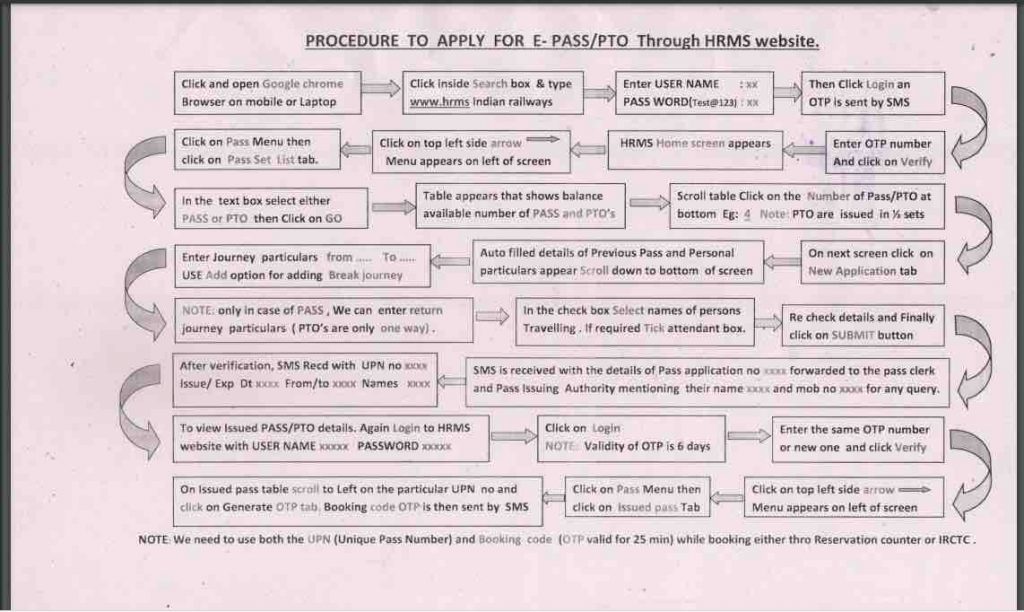
Download e-privilege-pass PTO-in-HRMS-Module
E-Pass Main Benefits
- The employee will be able to apply for a pass online from anywhere and get the E-Pass generated online.
- Railway employee is neither supposed to come to the office for applying for Pass nor has to wait for the pass being issued.
- The complete process of application and generation of Pass is mobile friendly.
- Ticket booking on pass may also be done online on the IRCTC site
Railway officials need to travel across distances for official work. This will boost the operational efficiency of officials. This facility will help Railway employees in using their pass hassle-free and simultaneously make the working of all officials involved in the issuance of Pass smooth.
HRMS project is a comprehensive plan for the digitization of the complete HR process of the Indian Railway. A total of 21 modules has been planned in HRMS. Basic data entry of around 97% of railway employees has been completed in Employee master and E-Service record modules of HRMS which had been launched last year. CRIS is also going to launch the Office order module and settlement modules of HRMS very shortly.
“Basic data entry of around 97% of railway employees has been completed in employee master and e-service record modules of HRMS, which had been launched last year,” the railways said. The CRIS is also going to launch the Office order module and settlement modules of HRMS very soon, the railway’s statement said.
Download Guidelines-for-e-Privilege-Pass-PTO-Module-of-HRMS
Pass Rules with Latest instructions
Pass Rules with latest instructions are here.
Download Railway-Pass-Rules
HRMS Module Manuals and Guidelines
Updating Executive SR
- Video Link for updating executive SR : https://youtu.be/BpL_9dno4bk
e-PASS Module
- e-Pass PPT
Settlement Module
- Settlement PPT
Office Order Module
- Office Order PPT
APAR Module
ESS Module
PF & Advance Module
AIMS Portal Online HRMS Registration for Railway ESS
AIMS is referred as Accounting Information and Management System which is a department of Indian Railways, and it is the world’s 4th large railway network employing to 13 lakhs of total employees, where the employee of Indian Railway works round the clock to serve the Indian National people.
AIMS Portal Indian Railway Registration Process
- Visit the official AIMS portal using the URL link as aims.indianrailways.gov.in
- Click on Employee Self Service
- Login page will be open in New Tab
- Go down and click on New User Registration
- Fill Employee Aadhaar Number, Mobile number and Date of birth
- Enter the data as per the employee records which registered already when appointment
- Click Submit
- AIMS will send submitted employee bio data with available data in IPAS.
- After getting a match with existing data of database, server sends initial password on employee mobile number through SMS
- Enter the received password
- Click on Register and Login Button
- When the employee data verified, your mobile number will receive the Registration successfull message. Along with that SMS,
- your new initial password which needs to change after your login for the first time.
- The server immediately verifies the password and allows the registered employee to access the Railway Employee Self Service (RESS) Portal by displaying the employee data
- Once done, details of an employee will be verified with IPAS data and allows to login to AIMS portal access
By the above way, the Indian Railway Employee can register themselves and get access to AIMS portal. After registration, you may pick the Pay Slip of any month you wish to download on your PC or laptop. So, you can access all the other like PF, Income Tax and more. Where this RESS portal online registration process is only for those who have been register with AIMS portal.
AIMS Indian Railway RESS Login
- Visit the AIMS portal using the Railway Employee Self Service RESS at aims.indianrailways.gov.in/mAIMS
- Now click on the Employee Self-service option and proceed further
- New Tab will open asking you to enter user ID and Password
- If your registered with AIMS, submit your registered email ID and password here
- Click on submit button and select the Salary Slip option from the options
This is actual place where you can get your AIMS pay slip to download and look at the Salary of yours for that month. Through this you can have a look at Payment sheet or career information by Indian railways on your employment from anywhere. Hope the below guide will help you to generate your Salary Slip and other in easy way.
FAQ
What is the HRMS Railway?
The Indian Railway was launched by the govt of India to bridge the gap between employees and administration. Through the Portal, Railway employees can apply for leave applications, transfer, promotions, and awards, nominations for retirement benefits, download payslips, and many more services.
What is Railway PTO?
Privilege ticket order’ (PTO) is an authority issued in favor of a railway servant which may be exchanged for a passenger rail ticket on payment of one-third of the normal fare.
What is Complimentary Card Passes?
Freedom fighters/their widows are issued Complimentary Card passes for free rail travel.
What is School Cheque Pass?
School Cheque pass can be issued to each such student son/daughter who is dependent on the Railway Servant
What is School Card Passes?
School Card Passes are being issued to the student wards of Railway employees to commute between the station of the residence of the Railway servant and the station nearest to the school/college up to a distance of 80 KMs.
How to log in on the Portal?
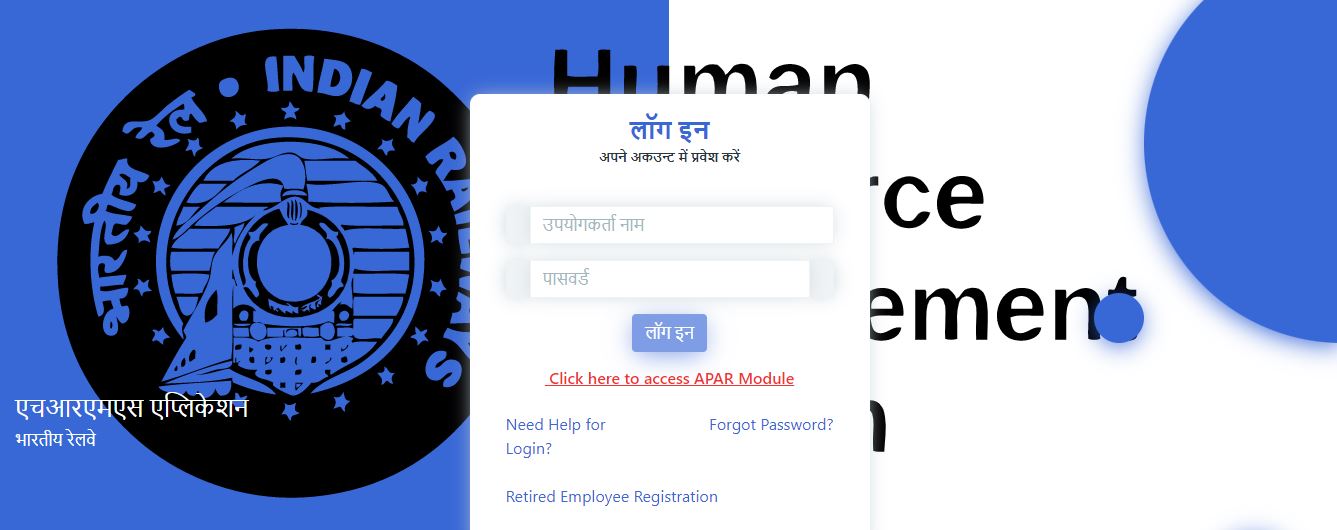
For login, you have to visit the Official website hrms.indianrail.gov.in and log in with your userID and password.
| Mobile App | Download Now |
| Official Site URL | Click here |
Helpdesk Number
In case of any issues please reach out to HRMS helpdesk:
1) Mobile no 8882704979 for WCR + CLW + CORE + SCR + SR
2) Mobile no 9990844679 for ER + RWF + SER + CTI + SWR.
3) Mobile no 7786940452 for NR + CR + BLW + IRPMU + DLW.
4) Mobile no 9971535534 for NCR + NER + RCT + RCF.
5) Mobile no 9953780947 for NFR + SECR + RDSO + RWP.
6) Mobile no 7838506047 for ECoR + NFRC + DMW +MCF.
7) Mobile no 9971168228 for RB + NWR + ICF.
8) Mobile no 7982542883 for ECR + METRO + COFMOW + WR
or write to us at irhrms@cris.org.in
Here’s a comprehensive guide to the IR HRMS Mobile App for Railway Employees, specifically focusing on the built‑in e‑Pass/PTO (Privilege Pass/Pass To Office) module for seamless e‑pass generation and booking:
📱 What Is the HRMS Employee Mobile App?
- A dedicated Android app developed by CRIS (Centre for Railway Information Systems) for Indian Railway employees to access HRMS modules on the go
- Available on the Google Play Store (v1.0.26 as of July 2025). iOS version is not yet available
- Offers features like accessing service record, leave, and e‑pass modules via your HRMS credentials
✍️ Register & Log In
- Download the “HRMS Employee Mobile App” from Google Play.
- Register using your IPAS/PF No. When registered, you’ll receive your HRMS ID and default password (e.g. Test@123), then verify with OTP sent to your registered mobile number
- Login using HRMS ID, password, and OTP each day (OTP valid till midnight)—both on web and mobile app
🎫 e‑Pass / PTO Module (Duty Pass)
📌 What You Can Do:
- Apply for e‑Privilege Pass or PTO directly through your HRMS app or web portal anywhere.
- Available to serving and retired employees (or eligible family pensioners)
- No need to visit PRS counters physically—all steps are digital.
⚙️ How to Apply: Step-by-Step
Using the Mobile App or HRMS Web:
- Navigate to Pass → Family Declaration, ensure your family member list is updated.
- Go to Pass Set List, select available pass sets (full/half).
- Click New Application, enter journey details (from/to, break stations), select members, and submit.
- Application goes for approval to Pass Clerk / issuing authority
- Once sanctioned, you’ll receive an SMS, and the e‑Pass PDF can be downloaded from “My Issued Passes” tab
- Invitation to generate Pass Booking OTP via that tab as and when needed; OTP is valid for 10 minutes for ticket booking
🧾 Booking a Ticket with e‑Pass
Via PRS Counter:
- Provide your Unique Pass Number (UPN) and Pass Booking OTP.
- Reservation clerk enters concession code “EPRPAS” (for e‑Pass) or “EPTO” (for PTO).
- Clerk fills passenger details exactly as in the pass.
- System validates e‑Pass; ticket is issued and PNR SMS sent.
- e‑Pass is updated with booking details automatically
Via IRCTC Website or RailConnect App:
- Select “Pass Booking” under Train menu.
- Enter journey, then provide UPN and OTP as part of passenger details.
- Upon validation, PNR is generated and ticket booked with concession
Via UTS (Unreserved Ticketing System):
- At UTS counters/app, use concession code “EPPASS” or “EPTORD”.
- Enter UPN and OTP; e‑Pass is validated and paired ticket issued (₹0 for e‑Pass or ⅓ fare for PTO).
- The e‑Pass PDF or printout must be presented with the ticket to the ticket inspector
📋 Summary Table
| Feature | Details |
|---|---|
| App & Access | Android only; register via IPAS/PF No., login with OTP |
| e‑Pass / PTO Module | Apply online, track application, download pass |
| OTP Issuance | Valid for 10 minutes, used for booking tickets |
| Booking Options | PRS counters, IRCTC web/app, UTS counters/app |
| Concession Codes | “EPRPAS” (e‑Pass), “EPTO” (PTO), “EPTORD” (UTS) |
| Constraints | e‑Pass alone is not valid — must be accompanied with a valid ticket |
✅ Tips & Best Practices
- Always keep your mobile number updated in HRMS for OTP delivery.
- Generate OTP only when you’re ready to book—it’s short-lived.
- Provide passenger details exactly as in the pass—mismatches lead to rejection.
- Printed copy or mobile screenshot of e‑Pass is mandatory during ticketing and checks.
- Check the app version and helpdesk support in case of login or module issues
Would you like step-by-step screenshots, help troubleshooting login or pass approval delays, or assistance with specific use of the pass in IRCTC or PRS booking?