

Tatkal Tickets Require Aadhaar Verification from July 2025
Effective July 1, 2025, only Aadhaar-authenticated users can book Tatkal tickets via IRCTC’s website or app. From July 15, 2025, Aadhaar-based OTP verification became required for all online bookings, PRS counters, and authorized agents to prevent fraud and ensure transparency.
What’s required now
-
From 1 July 2025, only IRCTC users whose accounts are “Aadhaar-authenticated” can book Tatkal tickets online.
-
From 15 July 2025, an additional step was introduced: Aadhaar-based OTP authentication (i.e. a one-time password to your Aadhaar-linked mobile) is mandatory for Tatkal ticket confirmation, whether booking online or via PRS counters / authorized agents / agents.
Why this change
The move aims to curb misuse — such as bulk booking by agents/bots, touting, and fake accounts — and to ensure Tatkal benefits genuine individual travellers.
Booking Restrictions
Authorized agents face a 30-minute restriction: 10:00-10:30 AM for AC classes and 11:00-11:30 AM for non-AC classes. Passengers must link their mobile number to Aadhaar and update IRCTC profiles accordingly.
How to Link Aadhaar with IRCTC Account
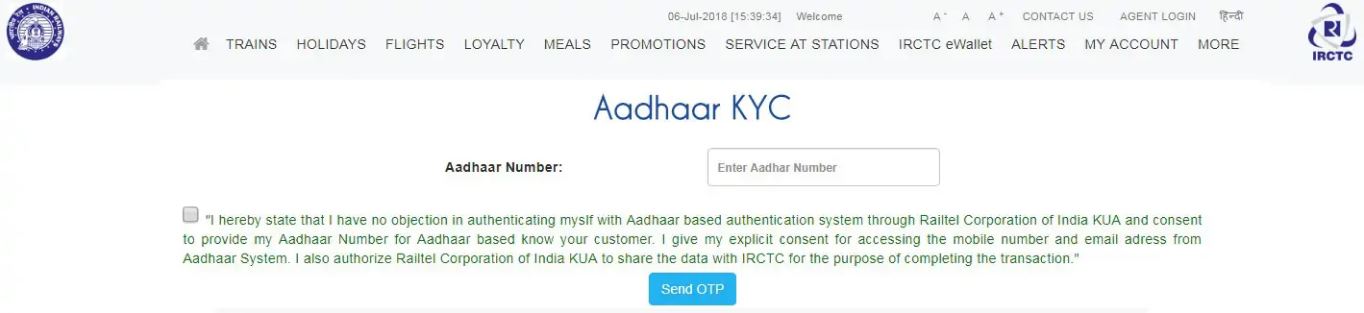
What you need before starting
-
An active IRCTC account.
-
Your 12-digit Aadhaar number (or virtual ID in some cases) and the mobile number that’s linked with Aadhaar — because you’ll receive an OTP (one-time password) there.
-
Make sure the name (and date of birth) in your IRCTC profile exactly matches what’s in Aadhaar — mismatches often cause failures.
Steps to Link Aadhaar with IRCTC
-
Open your web browser and go to the official IRCTC website (www.irctc.co.in).
-
Log in with your IRCTC username and password.
-
Click on “My Account” (or “My Profile” / “Account” — depending on what’s shown).
-
From the dropdown, choose “Authenticate User” or “Aadhaar KYC / Link Aadhaar” option.
-
Enter your 12-digit Aadhaar number (or Virtual ID, if supported).
-
Submit → you’ll get a 6-digit OTP on your Aadhaar-linked mobile number. Enter the OTP and click “Verify / Submit”.
-
Once OTP is verified successfully, you should see a confirmation message — your Aadhaar is now linked with your IRCTC account.
After Linking — What Changes / Benefits
-
From 1 July 2025 (for Tatkal) and from 1 October 2025 (for general reserved tickets, during first 15 minutes of booking window) onwards, Aadhaar-authenticated IRCTC accounts will be mandatory for booking online.
-
You may be allowed to book more tickets per month via your account compared to before.
-
It also helps with identity verification for concessions (senior citizens, Divyang, etc.) and reduces the chance of misuse/fraud.
Common Problems & What to Check If It Fails
-
Name or date of birth mismatch between your Aadhaar and IRCTC profile → fix your IRCTC profile name details first.
-
OTP not received — check that your Aadhaar-linked mobile number is active and correct.
-
If linking fails repeatedly, try from a PC/desktop browser instead of mobile app or vice versa (some users report that helps).